
Barnabas Racer FAQ
Barnabas Robotics
Barnabas Racer FAQ
Servo Motor Car Kit
Have a question about building or troubleshooting your Barnabas Racer? Check out the common questions and solutions below.
COMMON ISSUES AND SOLUTIONS
1. My Barnabas Racer doesn’t drive straight. The wheels seem to be turning at different speeds.
Continuous rotation servo motors can naturally run at slightly different speeds. If one wheel spins faster than the other, the Barnabas Racer may curve or pull to one side.
SOLUTION
- Adjust the speed of the motors in your code. For example, you can set one motor to run at maximum speed (0 or 180 degrees) while setting the other motor to run a little slower (such as 10 or 170 degrees).
- Make small adjustments to the values until the wheels are turning at approximately the same speed and the Racer travels straight.
2. My Barnabas Racer keeps resetting or is behaving erratically.
If your Racer unexpectedly resets or starts behaving erratically, the batteries may be running low. The motors can draw a significant amount of power, especially when the Racer is running at higher speeds.
SOLUTION
- Replace the 9V battery with a fresh battery.
- Use a 7.5V battery holder with 5 AA batteries. AA batteries have a higher capacity than a typical 9V battery, allowing the Racer to run longer without disruption. See how to mount the 7.5V battery holder to the bottom of the car, directly below the motors.
- Slow down the Racer. Faster motor speeds require more power. Reducing the motor speed in your code may help the Racer operate more reliably when using a 9V battery.
3. My Barnabas Racer doesn’t stop when I program the motors to 90 degrees.
The servo motor may need to be recalibrated. Over time, vibrations during operation can cause the motor’s stop point to shift slightly away from 90 degrees.
SOLUTION
- Manually recalibrate the motor. Use the calibration screw on the back of the servo motor to adjust its stop point. You will need to remove the motor from the chassis to access the screw.
- Adjust the stop value in your code. If setting the motor to 90 degrees no longer makes it stop, try a slightly higher or lower value, such as 95 or 85. Continue making small adjustments until you find the value that completely stops the motor.
Need help calibrating the servo? Watch our servo calibration video.
4. The caster wheel seems to bounce around or move erratically, causing the Racer to change directions unexpectedly.
This can happen when the caster wheel rotates more than 180 degrees and gets caught or turned into an awkward position.
SOLUTION
- Create a physical stop for the caster wheel. Add a simple stop that prevents the caster from rotating more than 180 degrees.
- Try reversing the orientation of the Racer. Mount the Racer so the servo motor wheels are at the front and the caster wheel is at the back. This allows the caster to be pulled behind the Racer instead of leading from the front, which may help it track more consistently.
Still Having Issues?
Contact us at support@barnabasrobotics.com for further support. Please include your order number and, if possible, a photo or short video showing the issue.
Let customers speak for us

We used the 100 pack Critter Bots package for our elementary school’s annual Robot Week for grades K-2 last spring. The package was well organized and the kids had an absolute blast customizing their critters and building them. I was impressed by the quality and simplicity of the project. The kids were able to complete the project with minimal guidance. Highly recommend for this age group!
As an extra perk, the team at Barnabas has been so helpful in guiding us as we continue Robot Week going forward, with lots of new ideas and project options. Thank you!

Our girls had an absolute blast! They were super engaged and loved following the steps to build their robots. We can’t wait to try more in the future!

I just finished an after school club session with 22 4th and 5th graders and we built this kit. It was very engaging and fun for them to learn how to code it.
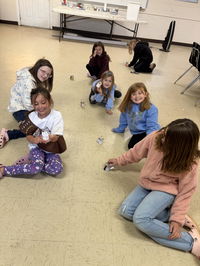
Our troop of girls absolutely loved this lesson and enjoyed seeing their robot come to life! Great lesson and video in explaining how robotics work and how they are made, all with putting that knowledge to work! Thank you from our girlscout troop!

We used this for the brownies robotics badge and the girls loved it! Highly recommend!

My Brownie/Junior Troop had a blast putting these together. The free curriculum and tutorials were a great resource! Will definitely be purchasing more from this company.
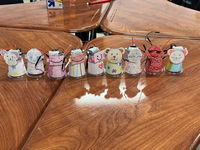
We had a fun robot build to relieve some stress in our Girls in STEM club. We had so much fun coloring and and building the bots and then playing with them in class!

I highly recommend Barnabas Robotics Kits. We purchased the Dancing Shamrock kit for ages 11 and up. We all learned a lot putting this kit together, adults and kids! The kids followed a video for instructions on the build. Edward Lee was quick to respond if I had any questions and I had several. We will try other kits in the future! Great Company and great product.
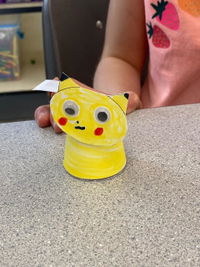
I did this with Kindergarten through 3rd grade. The kids loved the ability to make them into what ever creature or person they wanted. Everything was in the kit. I did add google eyes to them. All that was needed was coloring makers, pencils, or crayons. For Kindergarten and 1st grades I did stick down the motor for them, but they did everything else. For putting the body on the cup I told them to have the body oriented so it made a smile (ends curved up) not a frownie face.

Great product!! Easy to follow instructions, everything needed was included except the batteries!! My Girl Scout troop enjoyed doing these as part of their robotics badge.
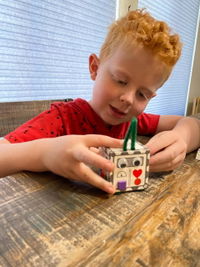
Contains everything needed. My grands enjoyed making these! (Ages 5-10)
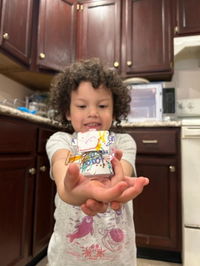
Theses little bots are amazing! My son had so much fun making theses little bits and it was such a fun activity to do as a family! I highly recommend theses for your bot loves or even something to do on a rainy day.
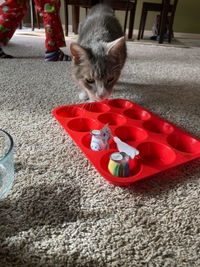
Looks like a great project to do with the grandchildren.
Oh my goodness. We just got these out last night for our grandkids to put together. We had a blast with them. They put them on the floor, on a ramp, in a box with a cutout door ( to see whose would go out the door the fastest. ). Today my daughter texted me and said “how many things can we put these in” with a picture of them hopping around in muffin tins! Definitely worth the cost for all the fun they’ve had.
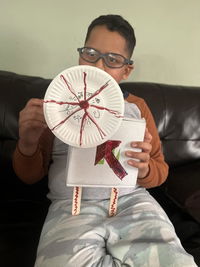
My son enjoyed putting it together and learning about an open and closed circuit. He has been sharing his invention with everyone! It was so much fun and we both learned from the activity
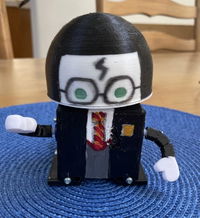
I am so impressed with the Barnabas-Bot: Arduino-Compatible 3-d Printed robot kit and highly recommend it. The Bot was easy to assemble and the lesson plans were very easy to follow. I love how easy it was to teach fundamental engineering skills to younger students, and how this company was eager and available for any help or guidance needed.